Data list
Database
When creating a Brixy list, you must select a database and create a new table or select an existing one.If you enter a new table name, then a new table will be created in the selected database with id and created_at fields.A form will be created for the list with a group containing these fields.
If an existing table is selected, then a list, form, and group will be created that will contain elements that will match all columns from that table.
Once the list is created, this data cannot be changed.
By default, table data is not sorted by any column. It can be set if necessary, and the order by condition will be generated and added to the query in the order in which the conditions are entered.
Pre-filters
Prefilters are used to filter the list based on various conditions that will be added to the main SQL query. They can be added when editing an already created list.
You need to select a field, condition, and value to use to check the condition. The data in the Value field will be interpreted depending on the selection from the Type menu.
- Pre-filter type text:
Тhe content of the selected field will be compared with the entered text;
- Pre-filter type eval:
Value field must contains valid php code that return some value/values. It will be compared with the contents of the selected Field;
Example: $a = 3; $b = 5; return $a + $b;Can use some special placeholders:
- '{view_mode}' with options list, add, edit, view;
- '{lang_code}' - will return current language code, e.g. 'en-US';
//If list opened or record opened for details view, then return current language code.
if('{view_mode}' == 'list' OR '{view_mode}' == 'view'){
	return '{lang_code}';
};
//---------------------------------------------
//IF form opened for new record or for edit record then return all available languages.
//This can be used in a group with the "Language Variant Repeating Group" template.
if('{view_mode}' == 'add' OR '{view_mode}' == 'edit'){
	$lang_codes = array_column($this->brixy_data['languages'], 'code');
	$lang_codes = implode(',', $lang_codes);
	return $lang_codes;
};
- Pre-filter type query:
Value field must contains sql query and connection id must be selected from dropdown. If no link is selected, the query will not be executed.
Example1: SELECT id FROM users WHERE email = 'example@gmail.com'.
Example2: SELECT id FROM users WHERE email like '%gmail%'.
Prefilter by url parameters:
$filters = [
	'791|dropdown' => 1,
	'320|input' => 'john',
];
$filters_enc = encrypt_decrypt('encrypt', json_encode($filters));
$full_url = 'your_url?d=' . $filters;
All filters must be in array. Then the array must by json encoded and encrypted with function encrypt_decrypt.
Every key filter in array is a string contains element_id and filter type separated by '|'. In example element ids are 791 and 320, filter types are dropdown and input.
When the filter type is a dropdown, the list will be matched against the database using the raw values of the selected item. If the element is a radio button with data [0 for No ; 1 for Yes] with a filter value of 0, it will show all records that have a value in the element column that is equal to 0. If you enter No, there will be no result.
If filter type is input the list will be filtered based on element plugin:
- id->exact match entity value;
- input, textarea ->all records contains entered value in element column;
- dropdown, radiobutton, databasejoin -> all records containing an element's option value filtered by the option labels containing the filter value. If the element is a radio button with data [0 for No ; 1 for Yes] with a filter value of No, it will show all records that have a value in the element column that contains 0. If you enter 0, there will be no result;
Filter values from example are '1' and 'john'.
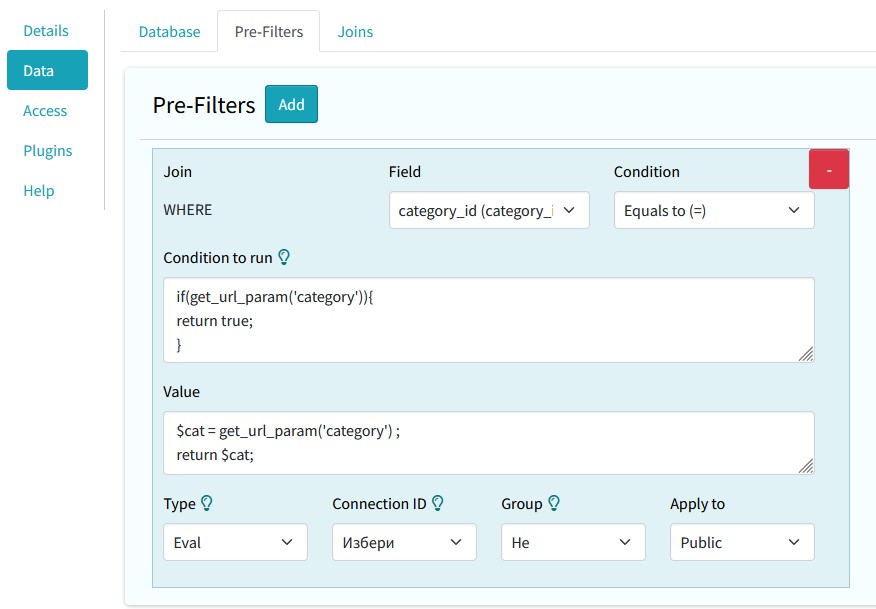
Filtering the list can be done in a combination of the previous two options: add url parameters and use them in the pre-filtering of the list.
Example:
https://your_url?category=2
Joins
From table means here always select the parent data (parent table). In form view the From column (usually primary key) value would be written into To column column.
Joining vice versa (from FK (foreign key) of parent to PK (public key) of child) is possible. This method not recommended unless if you know what you expect to get оr if you will be using read-only data.
In Brixy one of the join columns must be a PK (public key), usually id.
If you want to join tables from multiple databases, you must add privileges and use the same MySQL user for all databases.
- You should not create a join to a table (by selecting it from the drop-down list From table) that has a group already set to repeat. Do not link the same table more than once.
- Do not select the same table in the lists From Table and To Table from the same connection.
- If To table select value is changed then old join, group and group elements db records will be deleted.